
Design Features for Professional Printing
Corjl helps create download files that are ready for professional printing no matter the requirements. Use the features below to ensure your download files are ready for print!
🔍 Design Resolution
- Corjl download files are set to 300 DPI resolution by default for all file types to ensure crisp output.
- Exceptions: For very large-format posters and banners, PPI can be lowered to as low as 150 PPI and still obtain good quality print outputs.
📰 Bleed
- Corjl automatically adds the print industry standard bleed size of 0.125" (1/8 inch) bleed on all sides to the design Canvas when viewing and downloading with the Bleed.
- To add a bleed to your download file, check the Show bleed box in the Download options.
- To view the bleed while editing (if allowed by your designer), right-click in the area outside of the Canvas and select View > Show bleed.
🚑 Safety Line
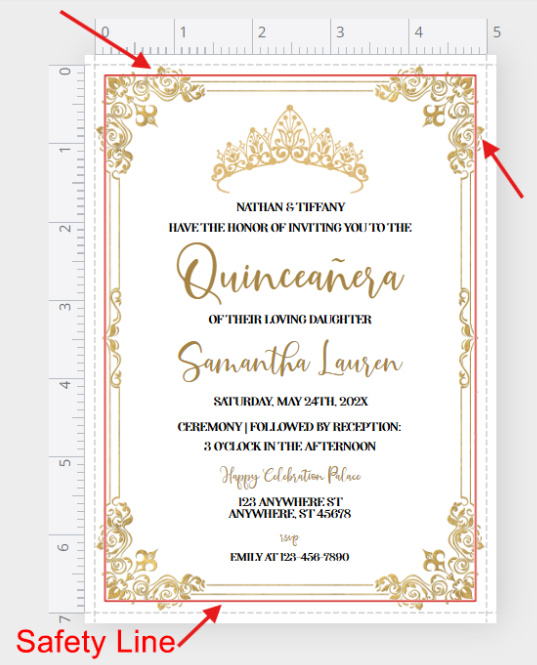
- Keep text and important design elements at least 0.25" inside the trim line (or edge of the canvas) to avoid cutoff during printing. This is called the "safety line."
-
To help keep text and other images inside this area, you will see a thin red line appear on the Canvas when images or text extend past this safety area:
🎨 Color Profile Considerations
- Colors on screen may appear more vibrant than in print, especially with bright or overly saturated tones like neon colors.
- In addition, please avoid font colors that are too light or pastel in color. Very light colors, especially for smaller text will be difficult to read on the printed page.
🗃️ File Export Formats
- Download your designs in either PDF or JPEG file formats.
- Both formats will be high-resolution and great for printing.
- Check with your printer for the best option.